Mina Telegram Bot
Mina Wallet & Alerts on Telegram
A Telegram bot that brings Mina blockchain features right where your community already is.
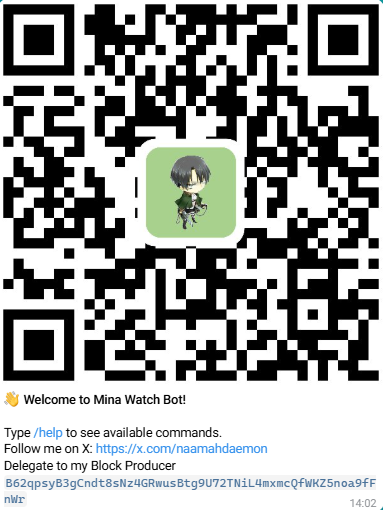
Add the bot to Telegram:
What the bot can do
- Wallets in Telegram: create, encrypt & store, list, set default, reveal private key (with password), delegate stake, send payments, tip users, claim faucets, and run rain distributions
- Address & Validator Watching: get alerts on transactions, delegations, zkApps, token transfers; get notified on validator block production (canonical/orphan)
- On-chain Insights: get current block/epoch, resolve truncated addresses, validator stats, payout estimations per epoch
- Leaderboards & Referrals: tips leaderboard and referrer leaderboard (public groups) + personal referral settings
- Mini-Games (public groups): /dice_roll and /guess (configurable tries & bet multiplier) with token stakes
- Mina Price Chart: view a quick price chart via
/pc - Faucet Claim: get 5 test MINA on zeko_testnet or devnet via
/faucet - Multi-Network:
mainnet | devnet | zeko_testnet(defaults indicated per command)
🧭 Convention
- Angled brackets
<...>= required- Square brackets
[...]= optional_italics_= default value- Aliases are shown with a pipe:
/command | /alias
Security & Custody Model
Your private key is securely encrypted and stored on our servers using modern cryptography (AES-GCM) and a password known only to you.
We never store your password, and it is never logged or sent anywhere beyond the secure Telegram channel you use to communicate with the bot.
When you perform an action that requires your private key (such as signing a transaction), the bot temporarily decrypts your key in memory only, using your password, to sign the requested operation.
Immediately afterward, the key and decrypted data are permanently wiped from memory.
Even in the event of a data breach or database leak, your encrypted keys would remain mathematically unusable without your password.
The bot server itself is not directly reachable from the Internet — it communicates exclusively through Telegram’s secure API channels.
What This Means
- Only you can use your key — nobody else knows your password.
- Your key never leaves the secure server environment in decrypted form.
- The server cannot access or recover your key without your password.
- The system provides a level of protection comparable to local non-custodial wallets.
However, because decryption and signing occur on the server (under your explicit command), this wallet is not strictly “non-custodial” in the pure cryptographic sense.
It is best described as a secure custodial wallet with zero-knowledge encryption — combining strong security, simplicity, and user control.
Summary
| Aspect | Description |
|---|---|
| Encryption | AES-GCM with Argon2 password-derived key |
| Password | Known only by the user, never stored or logged |
| Decryption | Performed temporarily in memory for each operation |
| Exposure | No inbound ports, Telegram API only |
| Custody classification | Secure custodial (zero-knowledge) |
| External attack surface | Extremely low |
How to Start
Getting started with the Mina Wallet Bot only takes a few minutes.
Follow these 4 simple steps:
1. Start a private chat with the bot
Open this link and press Start:
👉 https://t.me/mina_monitor_bot
All sensitive actions (password, private key, signing) must be done in private DM for security.
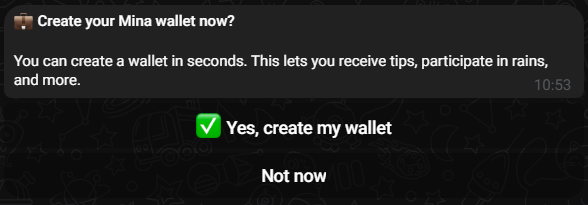
Upon start, you will be asked if you want to create your wallet (you can delay your wallet creation and create it later (See 2).
2. Create your first Mina wallet
In DM, type:
/create_wallet
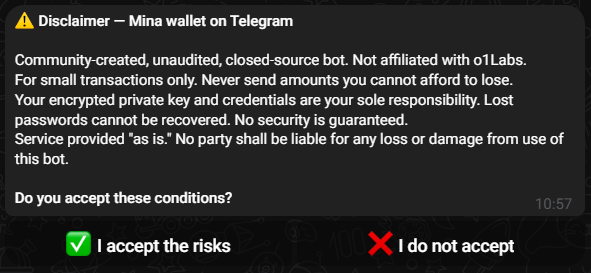
After having accepted the disclaimer :
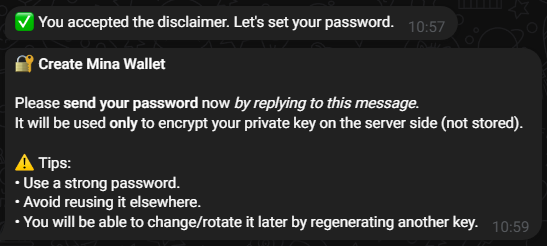
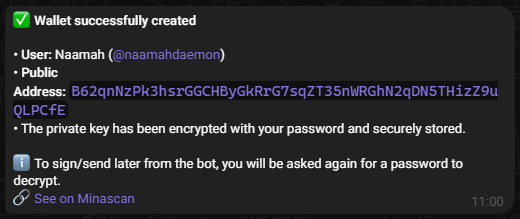
You will be asked to choose a password.
This password encrypts your private key and is never stored anywhere.
After confirming, the bot creates your wallet and displays your public address.
3. Claim a faucet (testnet only)
To get 5 test MINA on devnet or zeko_testnet, type:
/faucet devnet
or
/faucet zeko_testnet
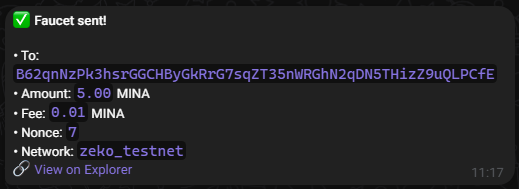
You can use these funds to test tips, games, or payments safely.
4. Send your first MINA (tip someone)
Once you have testnet MINA, try sending some:
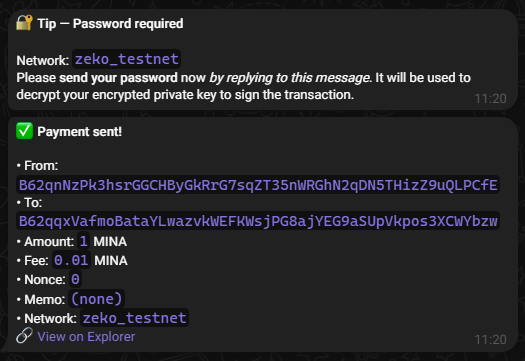
/tip B62qqxVafmoBataYLwazvkWEFKWsjPG8ajYEG9aSUpVkpos3XCWYbzw 1 0.01 zeko_testnet
or
/tip @telegram_username 1 0.01 zeko_testnet
The bot will ask for your password so it can decrypt your key in memory and sign the transaction.
You’re ready!
You now have a working wallet, funds, and the ability to send and receive MINA or use all the bot’s advanced features.
Private Chat Commands
DM the bot to manage your wallets, watchlists, referrals, and alerts.
Some commands have aliases for convenience.
Watchlists
Watch a wallet address
/watch | /wa <address> <label>
Receive alerts for:
- Payment in/out
- Delegation in/out
- zkApps
- Token transfers
Example
/watch B62qrmRJ...C7agyYEZ MY_WALLET
Unwatch a wallet address
/unwatch | /ua <address>
Watch a validator (block producer)
/watch_validator | /wv <validator_address> <label>
Example
/watch_validator B62qpsyB...a9fFnWr Naamah
Unwatch a validator
/unwatch_validator | /uv <validator_address>
Rename any watched entry (address or validator)
/rename | /rn <address_or_validator> <label>
List all watched items
/list | /l
Wallet Management
Create wallet
/create_wallet | /cw
Prompts for a password, creates a keypair, encrypts the private key, and stores it securely.
Delete a wallet
/user_delete_wallet
Removes a Mina wallet from your list.
List your wallets
/list_wallets | /lw
Shows your public addresses. The default one is marked.
Set default wallet
/set_default | /sd <wallet_address>
Sets <wallet_address> as your default for tip/send operations.
Show private key
/show_private_key | /spk [<public_key>]
Reveals your private key after password verification. If you have multiple wallets, specify the public key.
Delegate stake (from your Telegram wallets)
/delegate
Interactive flow to delegate the stake of your Telegram-managed wallets.
Transfers & Tools (DM)
Unless stated otherwise, default network is mainnet.
You can override withdevnetorzeko_testnetwhen supported.
Build & send with Auro (deeplink)
/send <recipient_address> <amount> <fee> [memo] [network_id (**mainnet**|devnet|zeko_testnet)]
Builds a payment link and opens Auro for signing/broadcast.
Tip from your wallet(s)
- Single-wallet flow:
/tip <to> <amount> <fee> [memo] [*mainnet*|devnet|zeko_testnet] - Multi-wallet flow (explicit source):
/tip <from> <to> <amount> <fee> [memo] [*mainnet*|devnet|zeko_testnet]
tocan be a B62 address or an @username (if they have a registered wallet).
Faucet (DM)
/faucet [devnet|zeko_testnet]
Claim a 5 MINA faucet on zeko_testnet or mina devnet (limited to 1 faucet per user).
Check balances
- Address:
/balance | /b <address> [*mainnet*|devnet|zeko_testnet] - All wallets of an @username:
/balance | /b <@username> [*mainnet*|devnet|zeko_testnet]
Price chart
/pc – Displays Mina price chart.
Alerts & Stats (DM)
Empty coinbase alert
/alert_coinbase | /ac on|off
Enable/disable global alerts when a block is produced with empty coinbase.
Validator stats
/validator_stats | /vs [epoch] [validator]
- No args → show global stats (current epoch)
- With
epoch/validator→ filter results
Resolve truncated address
/get_full_address | /gf <short_address>
Resolve B62...abcd → full address
Block & epoch info
- Current block/epoch/slot:
/get_block | /gb - Specific block:
/get_block | /gb <height>
Show all blocks (live scroll)
/show_all – Live stream of produced blocks (use with care).
Referrals (DM)
Show / update my referral
/my_referral | /mr
View or set your referrer code/username to participate in referral leaderboards.
Help & Menus (DM)
Help
/help – Displays this help menu with all available commands.
Menu
/menu – Opens the interactive button-based menu for quick access to main bot functions.
You can trigger the menu at any time to quickly access the main sections of the bot such as wallet management, delegation, epoch info, or watchlist.

The menu allows users to easily navigate core features without remembering all command names.
Each button corresponds to one of the major functional areas:
- ❓ Help — Displays the list of all available commands
- 📦 Epoch — Shows current epoch, slot, and block information
- 🗒️ Watchlist — Manage your watched addresses and validators
- 💰 Wallets — Manage your Mina wallets (create, list, set default, etc.)
- 🧭 Delegate — Delegate your stake to a validator
- 🆕 Wallet — Quickly create a new Mina wallet
Public Group Commands
Use these in public groups. Some actions (like rain or games) will require a DM confirmation (password) by involved players for security.
Info & Tools
/pc— Show Mina Price Chart/get_block | /gb— Current block height, epoch, slot/get_block | /gb <height>— Show block info for<height>/help— Quick help/menu— Open quick access menu/balance | /b <address>— Show balance in MINA/balance | /b <@username> [mainnet|devnet|zeko_testnet]— Show all balances of an @user (default: mainnet)/faucet [devnet|zeko_testnet]— Claim a 5 MINA faucet on zeko_testnet or mina devnet (1 faucet per user)
Wallet Actions in Group
These actions will ask the sender to confirm in DM (password) if they require signing.
Create wallet (guided in DM)
/create_wallet | /cw
Starts wallet creation flow (continues in DM).
Tip a user
/tip @telegram_user <amount> [fee] [memo] [*mainnet*|devnet|zeko_testnet]
Sends a tip from your default wallet. DM confirmation may be required.
Rain (random distribution)
/rain <amount> <nb_users> [fee] [memo] [network_id (**mainnet**|devnet|zeko_testnet)]
Randomly distribute <amount> among <nb_users> eligible members (must have a wallet & be in this group).
Requires DM confirmation (password). Summary posted in group.
Leaderboards (Group)
/leaderboard | /lb [*mainnet*|devnet|zeko_testnet] [YYYY-MM-DD] [YYYY-MM-DD]
Tip leaderboard over an optional date range and network./reflb
Referrer leaderboard.
Mini-Games (Group)
Players must have wallets & will confirm in DM before any transfer/signing.
First, users may need to opt-in to games (e.g. via a private/gametoggle if you keep that anti-spam switch).
Games are only available on testnets/devnets.
Dice Roll
/dice_roll @username <amount> [network_id (devnet|**zeko_testnet**)]
Challenge another user to a dice roll. Highest roll wins the pot.
- Bot DM flow: both players confirm with password
- On success: winner receives
<amount>from the loser (or split pot if you configured a pot logic)
Example
/dice_roll @alice 1
Guess My Number
/guess @username <amount> [number_of_tries(_default: 5_)] [bet_multiplier(_default: 1_)] [network_id (devnet|**zeko_testnet**)]
Challenge another player to guess a number between 1 and 100.
number_of_tries: how many guesses the opponent gets (default 5)bet_multiplier: if the opponent finds the number, they win multiplier × amount; if not, the starter wins 1 × amount
Examples
/guess @alice 2
/guess @alice 2 7 3
/guess @alice 2 7 3 zeko_testnet
The final DM result message includes the secret number for transparency.
Examples (Copy-Paste Ready)
Watch a wallet & get alerts (DM)
/wa B62qrmRJ...C7agyYEZ MY_WALLET
Watch a validator & get block alerts (DM)
/wv B62qpsyB...a9fFnWr Naamah
Enable Empty Coinbase alerts (DM)
/ac on
Get validator stats for an epoch (DM)
/vs 106 B62qrYi...tTiKhDe
Resolve a short address (DM)
/gf B62qpge...7pvLPAN
Claim faucet (DM or Group)
/faucet zeko_testnet
Open menu (DM or Group)
/menu
Show current block (Group or DM)
/gb
Show a specific block (Group or DM)
/gb 464299
Tip a user in group
/tip @alice 1 0.01 gz for testing zeko_testnet
Rain 10 MINA over 5 users in group (mainnet default)
/rain 10 5 0.01 Party time!
Create a wallet (Group → continues in DM)
/cw
Dice Roll (Group)
/dice_roll @alice 1 zeko_testnet
Guess My Number (Group)
/guess @alice 2 7 3 zeko_testnet
Payout Estimator (DM)
/get_payouts epoch=<num> publicKey=<validator> delegatePubkey=<delegator> [poolFee=5] [foundFee=8] [o1labsFee=5] [shareTxFee=0|1|2]
- With only
epoch&publicKey: validator’s production & rewards for the epoch - Add
delegatePubkeyto estimate delegator returns
Example
/get_payouts epoch=106 publicKey=B62qrYi...tTiKhDe
Notes & Best Practices
- Security first: The bot will always ask for your password in DM before any action requiring your private key.
- Networks: Many commands default to mainnet; specify
devnetorzeko_testnetwhen needed. - Aliases: Use the short forms (
/wa,/wv,/uv,/rn,/lw,/sd,/spk,/vs,/gf,/gb,/ac,/lb) for faster typing. - Gaming opt-in: If enabled in your deployment, users must first opt-in via a private
/gametoggle to avoid spam. - Group eligibility (rain/games): Users must have a wallet registered and be present in the group.